My Strategies
Last updated
The My Strategies page is the control center for everything you have added to your account — whether created by you, imported from the gallery, or shared by another user.
Once a strategy is added, it is fully yours. This page is where you activate it, adjust it, pause alerts, review performance, or remove it entirely.
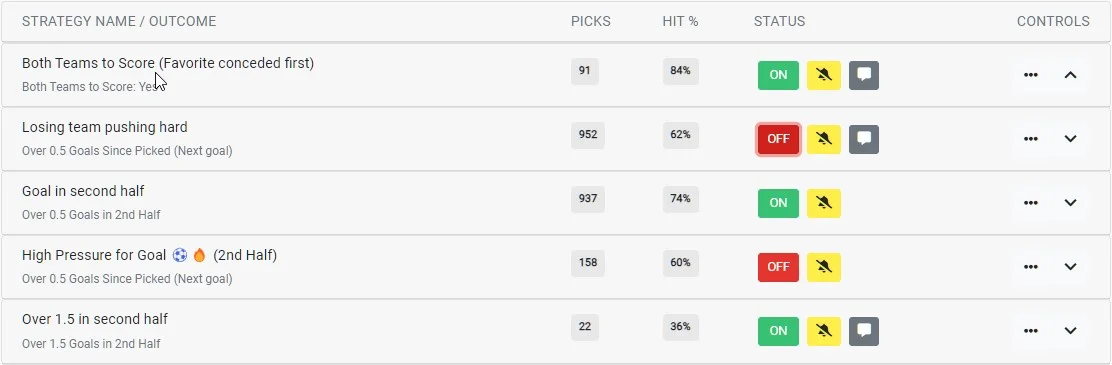
Strategy overview
Each strategy is displayed as a card. The header row shows its most important information and controls at a glance; expanding the card reveals the full anatomy of the strategy.
- Name & Tracked Outcome
- The strategy name is for your reference and appears in alerts. The Tracked Outcome (if set) is used to automatically track Hits and Misses.
- Pick Count & Hit Rate
- Shows how many matches the strategy has picked and the percentage of those that fulfilled the Tracked Outcome.
- Status (ON / OFF)
- Controls whether the strategy is actively scanning matches. Newly created strategies start OFF. Switching it ON enables picks, alerts, and history tracking.
- Muted
- When muted, the strategy remains active and continues recording picks, but no alerts are sent. This is useful during testing or review phases.
- Notes
- If a note exists, an icon appears. Notes are for your own reference and can be edited at any time.
- Controls
- Use the button for management actions, or the button to reveal the strategy’s rules.
Strategy menu
Clicking the button opens the strategy menu, which contains all management actions.
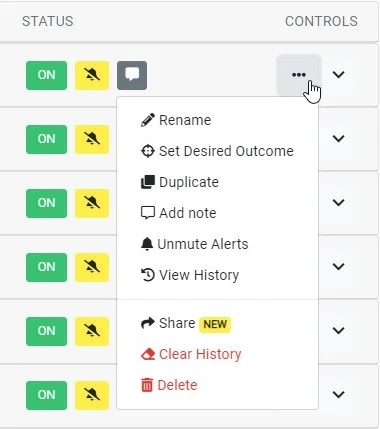
- Rename
- Change the strategy name. This also updates how it appears in alerts.
- Set Tracked Outcome
- Define or update the outcome used to automatically track Hits and Misses for future picks.
- Duplicate
- Creates a copy of the strategy without copying its history. Ideal for testing variations while keeping the original intact.
- Add Note
- Attach a private note for context, reminders, or observations.
- Mute Alerts
- Stops alerts while keeping the strategy active and recording picks.
- View History
- Opens the full history page for this strategy, including stats and outcomes.
- Share
- Generates a shareable link so others can import this strategy.
- Clear History
- Permanently removes all recorded picks for this strategy. This action cannot be undone.
- Delete
- Removes the strategy entirely from your account. This action is permanent.
Inside a strategy card
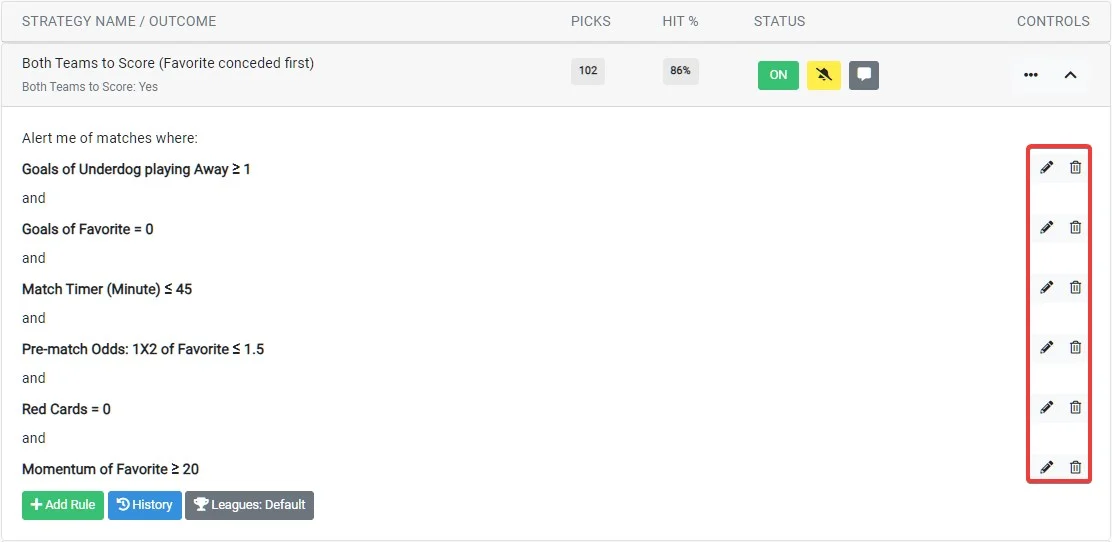
Click the icon to expand a strategy. The card reads like the logic it represents, in four sections from top to bottom:
- When
- Whether this is an In-Play strategy (evaluated live, as matches unfold) or a Pre-Match strategy — including how long before kick-off its alerts are sent, adjustable right on the card.
- Leagues
- Which competitions the strategy scans: All Leagues or one of your League Filters, switchable from the selector.
- If
- The strategy's conditions, shown as structured, color-coded blocks — the stat, the team it applies to, any time window, and the comparison. All conditions must be met (AND). Edit, remove, or add rules directly here.
- Then
- What happens on a match: the pick is recorded to History, and an alert is sent — unless alerts are muted or the strategy is switched off, which the card states clearly.
Sorting your strategies
You can change how strategies are ordered using the Order By control.
- Date Created
- Newest strategies first.
- Last Edited
- Most recently modified strategies first.
- Name
- Alphabetical order.
- Tracked Outcome
- Grouped by outcome type.
- Enabled
- Active strategies first.
- Muted
- Muted strategies grouped together.
- Note
- Strategies with notes grouped and alphabetized.
- Strike Rate %
- Highest performing strategies first.
- Pick Count
- Strategies with the most picks first.