Exporting Strategy Data
Last updated
InPlayGuru allows you to export detailed data from your strategies so you can review performance, spot patterns, and run your own analysis outside the platform.
Files can be downloaded in Excel (XLSX), CSV, or JSON format, making them easy to use with spreadsheet software, data tools, or custom workflows.
What’s included in the export
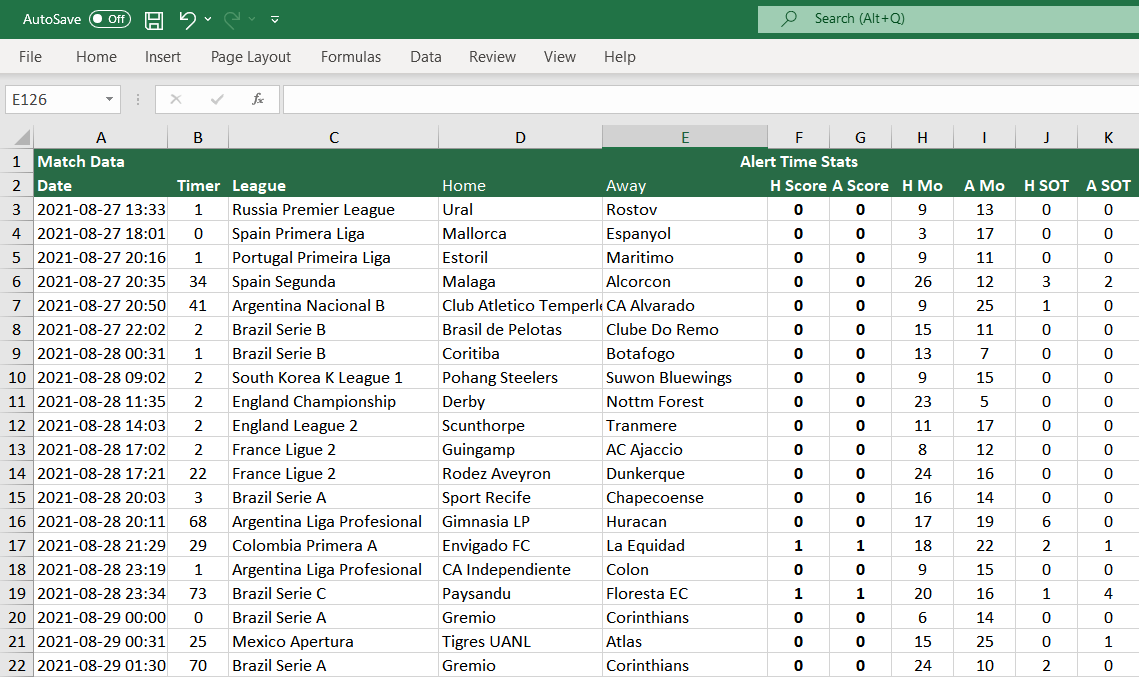
Each export is structured into clearly separated sections. Every section captures data as it existed at a specific moment in the match, allowing accurate historical review.
- Alert Time Stats
- In-play statistics exactly as they were when the match was picked by the strategy.
- Half-Time Stats
- Statistics snapshot taken at half-time.
- Full-Time Stats
- Final statistics recorded at the end of the match.
- Live Odds (Alert Time)
- Live odds as they stood at the moment the alert was triggered.
- Pre-Match Odds
- Odds available before kick-off for the selected markets.
- Goal Times
- A list of the exact minutes when goals were scored.
- Match Summary
- A concise summary of goals and corners for the match.
Requesting an export file
To request a file, open the History page of a strategy and click the Export button.
Export files are generated in the background and sent to you by email once ready.
At the moment, column selection inside exported files is not configurable. This is something we plan to expand in a future update.