Importing From the Strategy Gallery
Last updated
Creating effective strategies takes time and experimentation. To help you get started faster, InPlayGuru provides a Strategy Gallery containing example strategies shared by the community.
These strategies are best viewed as learning tools. They demonstrate how rules can be combined, how frequently a strategy may trigger, and how different types of logic behave in real conditions.
On the Strategy Gallery page, each entry displays:
- The strategy name and author
- Its historical Strike Rate
- How many matches it has picked
These indicators help you understand how often a strategy triggers and how it has behaved historically, not how it will perform in the future.

Reviewing strategy rules
Before importing a strategy, you can inspect how it is built. Click the Rules button to view the full list of conditions it uses.
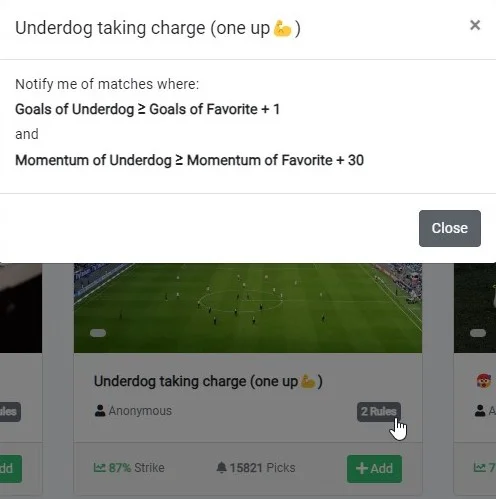
This is a great way to learn how different ideas are translated into rules, and to decide whether a strategy fits your goals before adding it.
Importing a strategy
To import a strategy into your account, click the Add button. The strategy will be copied directly into your My Strategies list.
Once imported, the strategy is entirely yours. You can rename it, edit rules, add or remove conditions, or use it as a starting point for something new.
Many users begin with gallery strategies and gradually evolve them into personalised setups as they gain experience with the platform.